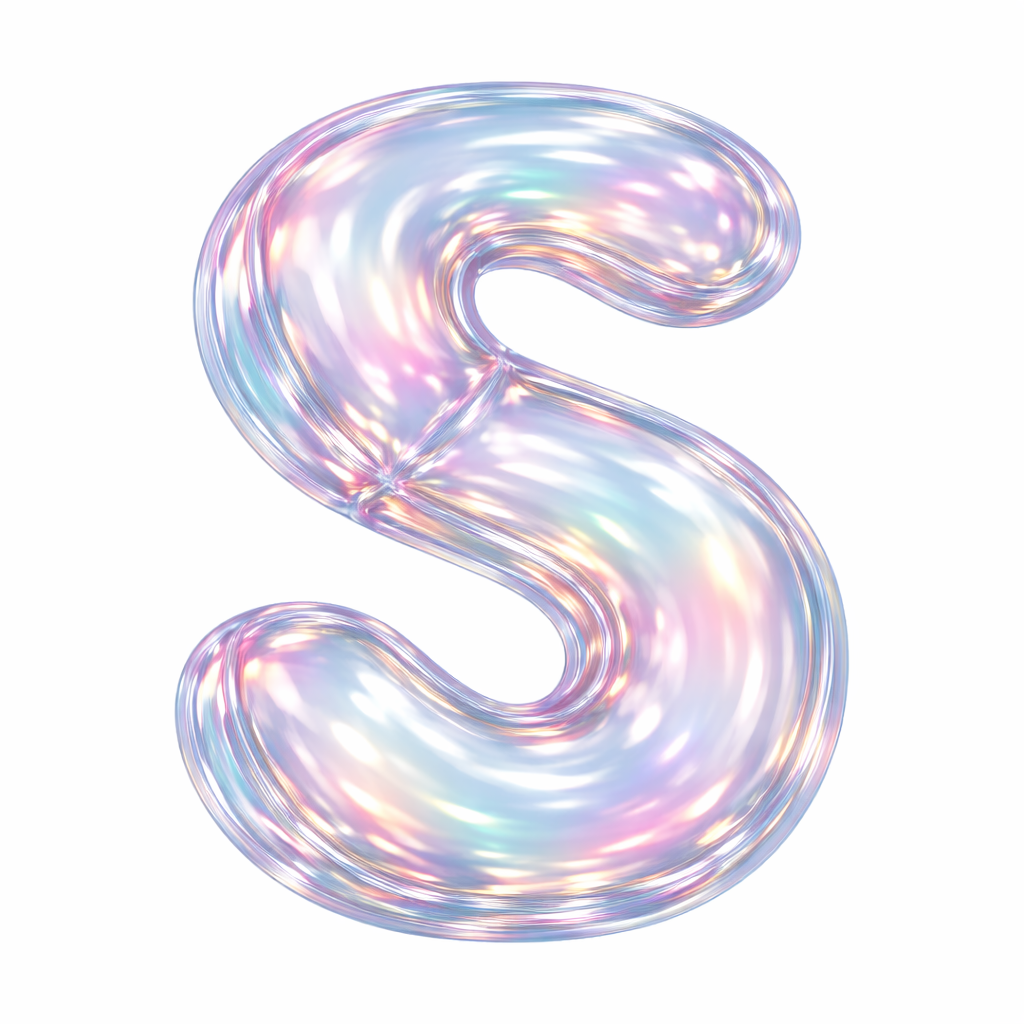
This guide explains how to use the 3D transparent glass balloon letter prompt to generate high-quality AI images. The prompt is designed to create realistic 3D alphabet letters that look like transparent glass balloons or blown-glass sculptures with beautiful rainbow reflections.
This style is ideal for:
- Logo design.
- Alphabet collections.
- Branding visuals.
- Posters.
- Social media graphics.
- Website decorations.
Prompt
generate a 3D letter (Add Here) in the style of a transparent glass balloon sculpture, similar to blown glass or inflated soap bubble material.
The surface must be smooth, glossy, semi-transparent, with iridescent rainbow reflections (pink, green, blue, gold, purple tones).
Light should reflect and refract through the surface include strong studio
lighting highlights, soft shadows and inner glow.
Maintain rounded, inflated balloon-like proportions the letter should look soft, weightless, and sculptural.
Material reference: hollow art toy made of clear colored glass, with visible edges and slight distortion.
Background: pure white or transparent background (PNG/ alpha)
- no gradients
- no shadows outside the object
View: centered front or 34 angle. High resolution.
1. Understanding the Prompt Structure 🧩
Your prompt is carefully structured to control material, lighting, shape, and background.
Main Prompt
Base Prompt:
Generate a 3D letter [LETTER] in the style of a transparent glass balloon sculpture, similar to blown glass or inflated soap bubble material.
This is the core instruction.
Replace [LETTER] with any letter:
Examples:
- Generate a 3D letter A
- Generate a 3D letter M
- Generate a 3D letter Z
2. Material Description (Glass Balloon Effect) 💎
This part tells the AI what the material should look like.
Prompt section:
The surface must be smooth, glossy, semi-transparent, with iridescent rainbow reflections (pink, green, blue, gold, purple tones).
Result:
The letter will look like:
- Clear glass
- Soap bubble material
- Inflated balloon
- Soft reflections
This creates a luxury and artistic look.
3. Lighting Instructions 💡
Lighting is essential for realistic glass rendering.
Prompt section:
Light should reflect and refract through the surface include strong studio lighting highlights, soft shadows and inner glow.
This creates:
- Realistic reflections
- Bright highlights
- Transparent depth
- Professional studio look
Without lighting instructions, the glass may look flat or unrealistic.
4. Shape Instructions 🎈
This section controls the balloon appearance.
Prompt section:
Maintain rounded, inflated balloon-like proportions the letter should look soft, weightless, and sculptural.
This ensures:
- Rounded edges
- Puffy shape
- Balloon style
- Artistic sculpture look
Without this, letters may look hard or metallic.
5. Material Reference Instructions 🧪
This helps the AI understand the physical structure.
Prompt section:
Material reference: hollow art toy made of clear colored glass, with visible edges and slight distortion.
This creates:
- Hollow interior
- Realistic glass thickness
- Slight optical distortion
- Artistic appearance
This makes the result more realistic and premium.
6. Background Instructions ⚪
Prompt section:
Background: pure white or transparent background (PNG/ alpha)
- no gradients
- no shadows outside the object
Result:
- Clean background
- Perfect for design
- Easy to edit
- Professional look
Ideal for:
- Logos
- Websites
- Posters
7. Camera Angle Instructions 📷
Prompt section:
View: centered front or 3/4 angle. High resolution.
Options:
Front View
- Straight angle
- Perfect symmetry
- Best for alphabets
Example:
View: centered front
3/4 View
- Slight perspective
- More depth
- More artistic
Example:
View: 3/4 angle
9. Best Settings for Perfect Results ⭐
For best quality:
Use:
- High resolution
- Square format (1:1)
- PNG format
- Transparent background
Recommended size:
- 2048 × 2048
- 3000 × 3000
- 4096 × 4096
10. Pro Tips for Better Results 🚀
Tip 1 — Use Capital Letters
Better results:
Generate a 3D letter A
Instead of:
Generate a 3D letter a
Tip 2 — Add “Ultra Realistic”
Example:
Ultra realistic 3D letter A
This increases realism.
Tip 3 — Add “Octane Render”
Example:
Octane render style
This improves:
- Glass realism
- Lighting
- Reflections
Tip 4 — Use “Clean Edges”
Example:
clean edges, perfect geometry
This avoids distortions.
11. Common Mistakes to Avoid ❌
Mistake 1 — Missing Transparency
Wrong:
Generate a glass letter A
Correct:
semi-transparent with iridescent reflections
Mistake 2 — Dark Background
Wrong:
black background
Correct:
pure white or transparent background
Mistake 3 — Hard Edges
Wrong:
sharp edges
Correct:
rounded balloon-like proportions
12. Best Uses 🎨
This prompt works perfectly for:
- Alphabet packs
- Logo letters
- Brand initials
- Poster typography
- Social media designs
- Website headers
- AI art collections

Leave a Reply