
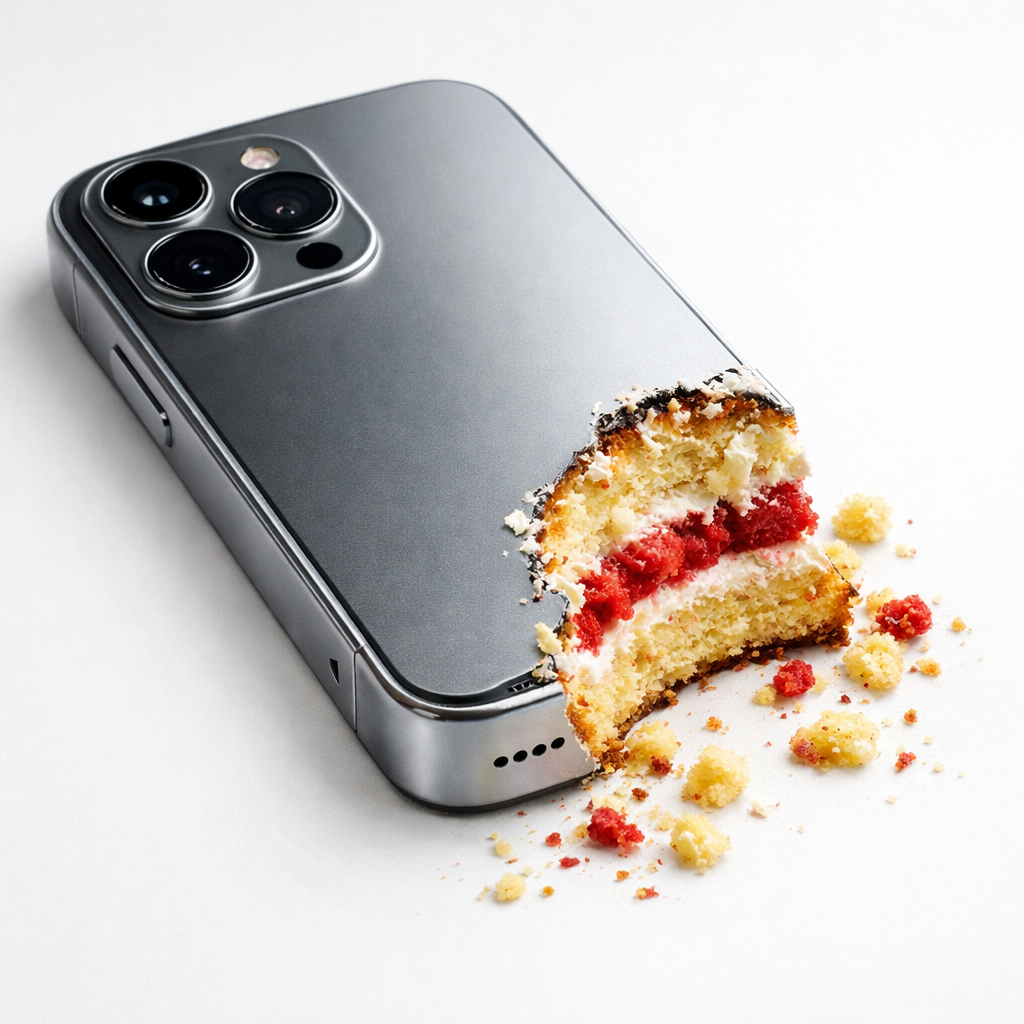
Hyper-realistic object-shaped cakes have become a viral visual trend across social media and advertising. These images surprise viewers because everyday objects suddenly reveal themselves as cake once bitten, creating a playful illusion that grabs attention instantly.
This guide explains how to use the provided prompt effectively to generate high-quality, photorealistic cake illusions using AI image tools. You’ll learn how each part of the prompt works, how to customize it, and how to achieve professional results suitable for Pinterest, ads, or social media content.
The Prompt:
Create a hyper-realistic, photorealistic illustration of a cake expertly crafted to look exactly like a [object], placed on a clean white surface. The object should appear authentic at first glance but be partially bitten, revealing rich cake layers such as sponge, frosting, and crumbs inside, creating a convincing illusion break.
Use a slightly overhead camera angle to highlight the contrast between the realistic exterior shell and the soft cake interior. Add high-detail bite marks, crumbs, and scattered cake pieces to enhance realism and storytelling.
Light the scene with soft, diffused studio lighting to emphasize textures while casting gentle, natural shadows for depth. Keep the background minimal and bright so the subject remains the clear focal point.
Use a vibrant yet tasteful color palette for the cake layers, contrasting subtly with the realistic outer surface. Render in a clean, commercial product photography style with a slight whimsical touch, ensuring the result looks both believable and appetizing.
Quality tags: ultra-detailed, studio lighting, shallow depth of field, realistic textures, premium product photography, high resolution, cinematic realism.
Understanding the Core Idea
The concept is simple but powerful: an ordinary object is secretly a cake. When part of the object is bitten, realistic cake layers become visible inside.
The illusion works because viewers initially believe they are looking at a real object, not food. The reveal creates surprise, humor, and visual curiosity.
Common objects used include phones, shoes, handbags, gaming controllers, cosmetics, tools, fruits, or luxury items.
Breaking Down the Prompt Structure
Each part of the prompt controls a specific visual element. Understanding this helps you modify it for different results.
Object Transformation
The cake must perfectly mimic the chosen object. Shape, color, texture, and surface materials must look authentic at first glance.
For example:
• A sneaker should show fabric texture and laces.
• A phone should show metal edges and camera details.
• A handbag should show stitching and leather texture.
Only after the bite should viewers realize it is cake.
The Bite Reveal Effect
The bite is the storytelling element. It must clearly expose:
- Soft sponge layers
- Cream or frosting layers
- Cake crumbs and texture
Crumbs scattered around make the illusion believable and dynamic rather than staged.
A clean or artificial bite ruins realism, so irregular bite marks improve authenticity.
Camera Angle Choice
The prompt suggests a slightly overhead angle, which works well because:
- It shows both top and interior layers
- It feels natural, like food photography
- It keeps the object recognizable
Too much overhead makes it flat, while eye-level angles hide interior layers.
Lighting Style
Soft studio lighting is essential because harsh light creates unrealistic shadows.
- Soft diffused lighting:
- Shows cake textures clearly
- Creates gentle shadows
- Maintains commercial product quality
- Feels clean and professional
This style mimics advertising and catalog photography.
Background Simplicity
A minimal white or light background ensures the cake remains the focal point.
Busy backgrounds distract from the illusion. Professional product photography often uses neutral backgrounds for this reason.
Color Strategy
The outer surface should look realistic, matching the object’s natural color.
Inside layers can be vibrant but tasteful, such as:
- Vanilla sponge
- Chocolate sponge
- Strawberry layers
- Colored frosting
The contrast makes the reveal visually exciting.
Rendering Style
The final image should resemble commercial product photography with a playful twist.
- This means:
- Highly detailed textures
- Natural reflections and shadows
- Clean, professional presentation
- Whimsical surprise element
The result should look like a real photo, not digital art.
How to Customize the Prompt
You can replace the object placeholder with almost anything.
- Examples include:
- Luxury watches
- Sneakers
- Smartphones
- Makeup products
- Cars or bikes
- Game controllers
- Coffee cups
Objects with recognizable shapes work best.
Tips for Best Results
- Choose objects people instantly recognize
- Keep the bite area visible but not overwhelming
- Add crumbs for realism
- Use soft lighting instead of dramatic lighting
- Keep backgrounds simple
- Avoid clutter in the scene
Small realism details dramatically improve results.
Best Use Cases
This type of image performs extremely well for:
- Pinterest content
- Food illusion art pages
- Product marketing visuals
- Social media viral posts
- AI art portfolios
- Creative advertisements
The surprise factor increases engagement and shareability.
Common Mistakes to Avoid
- Poor object resemblance breaks the illusion
- Flat lighting removes realism
- Too clean bite marks look fake
- Busy backgrounds distract attention
- Overly bright colors reduce realism
Balance realism with playful presentation.
Final Thoughts
This prompt works because it combines realism with surprise. A familiar object suddenly becomes edible, which makes viewers stop scrolling and look again.
By carefully controlling lighting, camera angle, textures, and details, you can create images that feel both professional and entertaining.
Mastering this style allows creators to produce highly engaging visuals that stand out across social media platforms.


Leave a Reply